


Description
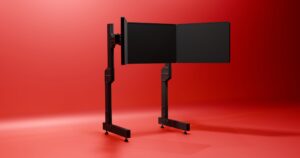
Simforge Triple Screen Monitor Mount — Immersive Triple Monitor Stand for Sim Racing Rigs
Unlock full peripheral vision with the Simforge Triple Screen Monitor Mount, a heavy‑duty triple monitor stand engineered for sim racing rigs that demand stability, fine adjustability, and clean cable routing. Whether you run 27″ gaming monitors, 32″ curved displays, or compatible ultrawide monitors, this mount delivers a seamless panoramic field of view for realistic depth, speed, and apex visibility.
Backorder Lead Time – 7-10 Bussiness Days
Why triple screens for sim racing
- Massive FOV: Side monitors eliminate blind spots, improving spatial awareness, braking references, and racecraft.
- Comfort & pace: Natural head movement and bezel‑matched angles reduce eye strain in long stints.
- Consistency: Fixed, repeatable geometry keeps cockpit sightlines stable between sessions.
Key features of the Simforge Triple Monitor Stand
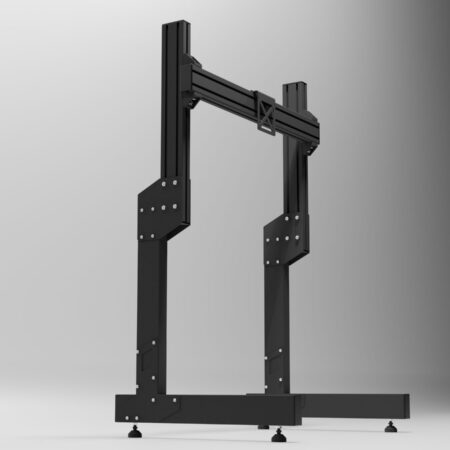
- Rigid construction: Heavy‑duty aluminum profiles with steel reinforcement minimize flex vs desk mounts.
- Wide compatibility: Three VESA plates support VESA 75×75 and 100×100 patterns for mainstream displays.
- Fine adjustability: Height, tilt, lateral slide, and toe‑in angle for perfect bezel alignment and curvature.
- Clean assembly: Pre‑marked holes, included bolts and nuts, and tidy cable paths speed setup.
- Rig‑friendly: Designed to pair with 80/20 profile cockpits and popular wheel stands using adapter plates.
VESA Adapter Kit included with the Triple Monitor Stand
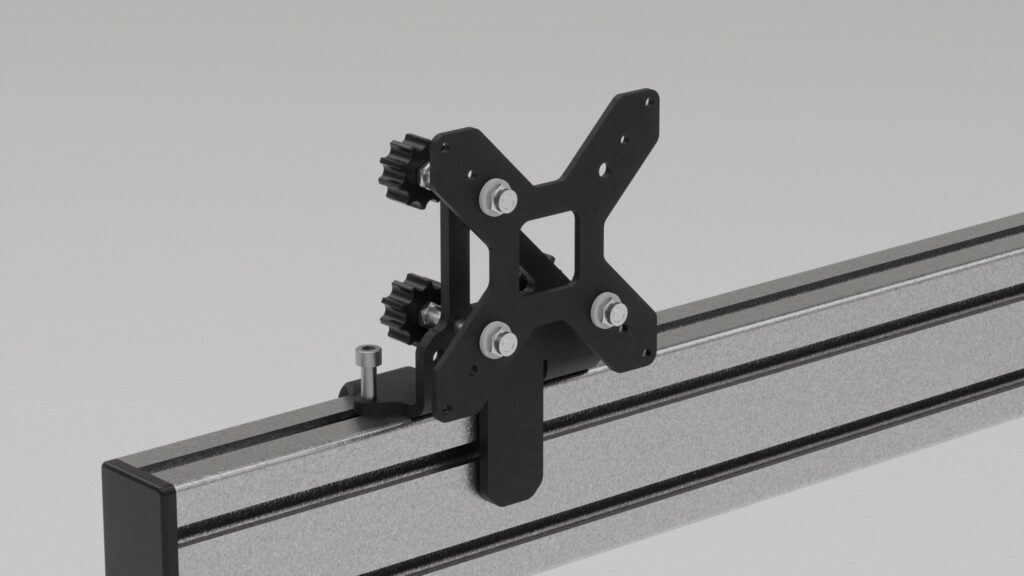
The bundle includes the official Simforge VESA Adapter Kit, a universal, adjustable VESA adapter designed specifically for sim racing monitor stands and profile cockpits. Engineered for 75×75 and 100×100 VESA patterns, this VESA mount adapter kit delivers precise alignment and rock‑solid clamping for 27″–32″ gaming monitors and many curved or ultrawide displays.
- Expanded patterns: Step‑up/step‑down plates bridge 75×75 and 100×100 for more monitor brands.
- Precision alignment slots: Micro‑adjust the centerline to align perfectly with your wheel hub.
- Reinforced hardware: High‑tensile fasteners deliver a rigid, rattle‑free mount over time.
- Faster installs: Marked hole spacing and included spacers simplify curved or recessed backs.
Learn more or buy separately: Simforge VESA Adapter Kit.
Technical highlights
- Materials: 80×40 aluminum profiles, steel joiners, powder‑coat finish
- VESA: 75×75, 100×100 (adapters available for other patterns)
- Screens: Optimized for 27–32″; supports many curved displays within VESA and weight limits
- Adjustments: Height, tilt, depth, lateral slide, and side‑panel toe‑in for bezel‑to‑bezel alignment
Compatibility
Works with leading rig ecosystems and peripherals, including Logitech G29/G923, Thrustmaster T300/T818, Fanatec CSL/ClubSport/Podium, and MOZA Racing setups. Check VESA pattern and monitor weight before installation.
What’s in the box
- Reinforced aluminum/steel frame
- 3× VESA Adaptor Kits with complete fixing hardware
- Tools for quick and easy assembly
Pro setup tips for the Simforge Triple Monitor Stand
- Match center monitor to eye height; add slight downward tilt to cut glare.
- Set side‑monitor toe‑in so bezels converge at your seated viewpoint for a seamless arc.
- Use a consistent viewing distance and FOV calculator to keep scale realistic between cars and sims.
Upgrade and ecosystem options
- Simforge Apex Sim Racing Cockpit — zero‑flex foundation for heavy FFB
- Simforge Wheel Stand Pro — compact base; add cockpit later
- Simforge VESA Adapter Kit — extended patterns and micro‑adjust slots
- Simforge Single Monitor Stand — start single, upgrade to triple when ready
FAQ
What monitors are supported? Best with 27–32″; ultrawides supported when VESA pattern and weight match specifications.
Can I align the bezels perfectly? Yes—height, tilt, and toe‑in adjustments plus VESA slots help you achieve pixel‑level bezel alignment.
Is it difficult to assemble? No—pre‑marked holes, included hardware, and clear steps make installation straightforward.
Videos giving More info on Monitor Mounts for Sim Racing
32 Inch vs 27 Inch Triple Screen Monitors for Sim Racing- Which Is Better ?
The Ultimate Sim Racing Monitor Buyers Guide
Screen Sizes and Setups for Sim Racing – BEGINNERS GUIDE
What’s the ideal screen size for a Triple Screen Sim Racing Rig
How to setup your CORRECT FOV for Simracing! – (Single Monitor)
Reviews
There are no reviews yet.